What is AnyDesk?
AnyDesk is a fast, secure remote desktop application that enables users to access and control devices from anywhere. It’s designed for both individual users and businesses, offering intuitive features like screen sharing, file transfer, session recording, access control, and more.
AnyDesk client
The AnyDesk client is the desktop or mobile application you use to remotely connect to others or allow them to connect to you. It gives you full control over remote devices and supports essential features like file transfer, clipboard sharing, session recording, session request, and many more.
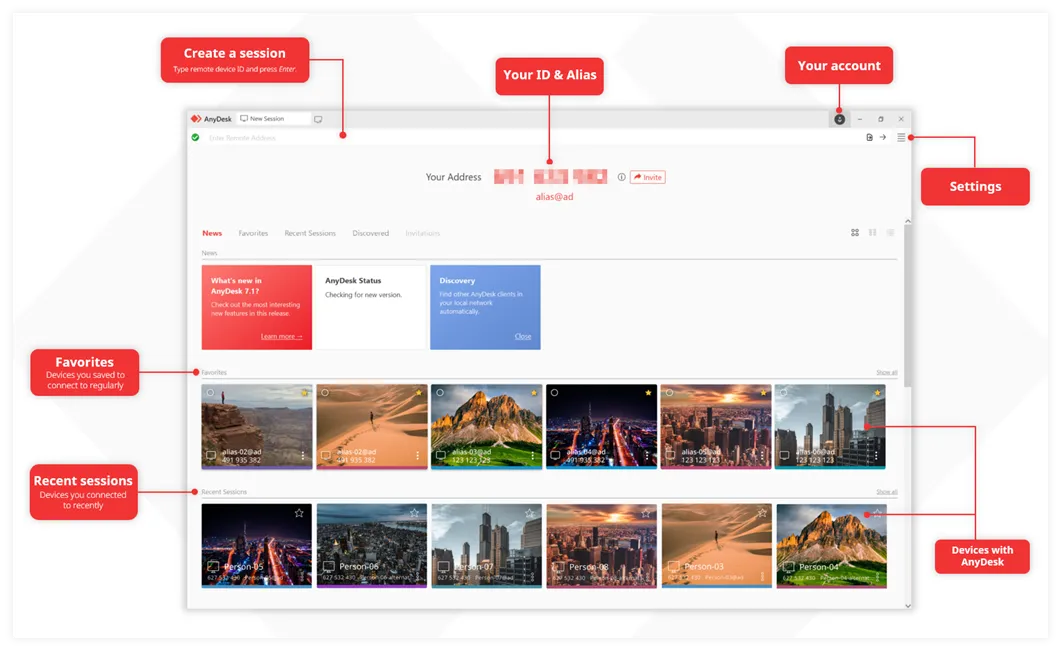
The main window of AnyDesk consists of the following:
- AnyDesk Address - ID & Alias. Your unique identifiers for remote connections.
- Create a session. Initiate remote connections instantly.
- Your account. Link your license by signing in.
- Settings. Adjust security, unattended access, and interface preferences.
- Favorites & Recent Sessions. Quick access to your most-used and recent connections.
my.anydesk
The my.anydesk II console is a web-based user and device management portal. It provides centralized control for organizations to manage users, clients, and permissions.
The main features of my.anydesk II include:
- Alias Management. Assign or update Aliases for easier device identification.
- License Control. Manage which clients are linked to your professional license.
- Session Monitoring. View active connections and access detailed session reports for auditing.
- Custom Client Generator. Create customized installers with your branding and preset configurations.
- User & Role Management. Organize users into groups and assign specific permissions (Admin, Viewer, etc.).
- Centralized Security. Reset license keys and manage access control across your fleet.
For all matters related to billing and subscription management, please contact your authorized partner, as these administrative tasks are handled externally to ensure personalized service.
Click to continue reading
- Published at