Error messages
This section provides a list of common AnyDesk error messages, their cause, and potential solutions. Whether you encounter connection issues, status messages, or fatal errors, this guide will help you understand and troubleshoot them effectively.
In the table below, find the connection-related errors that may prevent you from accessing AnyDesk. These errors typically occur due to network issues, incorrect configurations, or firewall restrictions.
| Message | Description |
| Cannot connect to/Disconnected from the AnyDesk network | This error appears when the AnyDesk client fails to connect to the AnyDesk server. * For Cloud versions, ensure the host device has an active internet connection and that Security Settings allow access to AnyDesk servers. * For On-Premises versions, verify that the host device can connect to your On-Premises server. |
| Waiting for image / Black screen | The display drivers on the remote device may be disabled or turned off. |
| AnyDesk is not connected to the server. Please check your internet connection | Typically caused by network problems or firewall settings blocking AnyDesk. |
| Windows error codes (win32_10060, win32_11001, win32_10054) | These error codes are generated by Windows and usually indicate firewall misconfigurations. |
Status messages
Status messages provide real-time updates on your AnyDesk session and may indicate configuration issues.
| Message | Description |
| Could not log in to the remote computer. AnyDesk’s window must be open on the remote computer in order to connect. | The remote device must have AnyDesk’s window open to accept the connection. |
| The session was interrupted on the remote side. Please wait while AnyDesk is trying to restore the session. | This occurs due to firewall settings or network interruptions. |
| The session was denied due to the access control settings of the remote computer. | Your ID is not whitelisted in the Access Control List (ACL) of the remote client. |
| Your license does not allow more sessions. Please close other sessions or contact sales to obtain an upgrade. | If your session limited is exceeded, close other active sessions that can run on the background or upgrade your license. |
| The session has ended. Status: desk_rt_27 | The session was automatically disconnected after a period of inactivity. |
Messages while connected
These messages appear when you are actively using AnyDesk but face restrictions or limitations.
| Message | Description |
| Please wait for the Remote User to accept the UAC dialog. | The remote user must approve the User Account Control (UAC) prompt. |
| Too many rejected connection attempts. Please try again later. | After multiple rejected Session Requests, further attempts may be blocked temporarily. |
| Logging on to the remote computer us blocked by the AnyDesk settings. | The remote device is set to block incoming connections. |
| Remote display server is not supported (e.g., Wayland) | If the remote system is running Linux with Wayland, switching to X11 may resolve the issue. |
Fatal errors
A fatal error occurs when AnyDesk crashes unexpectedly due to a system issue. In such cases, a crash dialog appears with technical information about the error.
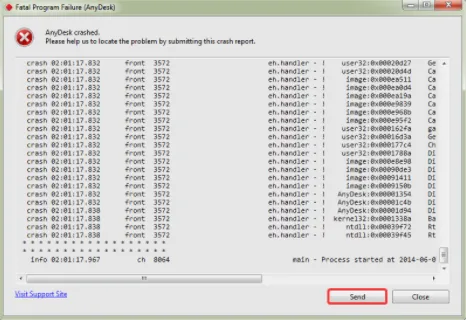
Click Send to submit the crash report to AnyDesk. This report includes diagnostic data, such as your device’s IP address, and helps our team investigate the issue.
To assist support further, please send the following details:
- The crash ID displayed in the dialog
- A brief description of the actions leading up to the crash
- A copy of the crash report, if available
Exit codes
Exit codes are useful for developers and IT administrators integrating AnyDesk into scripts or other applications.
| Code | Description |
| 1000-1001 | Missing system file (e.g., ntdll.dll, kernel32.dll) |
| 7000-7003 | Path issues, signature check failures, or unrecognized commands. |
| 8000 | Admin privileges required. |
| 9000-9007 | Generic errors, license registration failures, or invalid parameters. |
| 9010 | AnyDesk service not running. |
| 0xad1000-0xad1006 | Installation-related issues. |
Options available in AnyDesk to enhance the security of remote connections, including password protection and access controls.
A security feature that lets you define which AnyDesk IDs or Aliases are allowed to connect to a device. All devices outside of your Access Control List are automatically blocked.
An individual whose device is being accessed or controlled by someone else using AnyDesk.
A Windows feature that helps prevent unauthorized changes to the operating system, which may affect AnyDesk functionality.
A feature in AnyDesk that allows support agents to connect with users via a session link without needing the user’s AnyDesk ID, streamlining remote support.
Click to continue reading
- Published at