Configure TCP tunneling
TCP tunneling allows you to access services on a remote device as if they were running locally. This is useful for accessing internal web applications, industrial controls, or file storage systems from outside the remote network.
Setting up TCP tunneling
You can configure tunneling in two ways:
- From the context menu in the Discovery, Favorites, Recent Sessions, or Address Book lists.
- During an active session, via the Actions menu in the session toolbar.
🚨 IMPORTANT
TCP tunneling relies on the SMB authentication protocol. If the connection requires SSL, HTTPS, or hostname validation, the tunnel may not work properly.
Tunneling directions
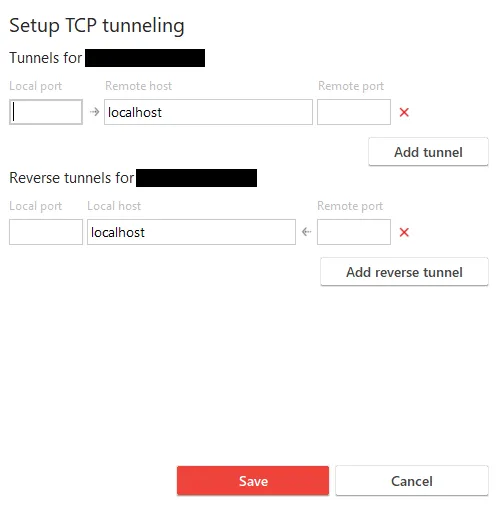
AnyDesk supports two types of tunnels:
-
Forward tunneling: Forwards a request from a local port to a
<hostname>:<port>destination on the remote device. -
Reverse tunneling: Forwards a request from a remote port to a
<hostname>:<port>destination on the local device.
VirtualBoxVM_GDw3GvD07J -
Local ports are those used on your local device to access services running on the remote device.
-
Remote hosts and ports are typically defined by the web application or service running on the remote network.
💡 NOTE
You can create multiple tunnels as long as listening ports do not conflict.
Example use case
Your web application server is only accessible on the remote office network at:
arduinoCopyEdithttp://internal.specialized_software.com:8080
Plain text
Copy
You have two options to access this server remotely:
- Connect to the remote device and use its browser or terminal to access the application directly.
- Use TCP tunneling to access the application from your local browser or terminal.
Using a local port
If port 1234 is available on your local network, configure the tunnel to forward:
- Local port:
1234 - Remote destination:
internal.specialized_software.com:8080
Once the session is active, open your local browser and go to:
arduinoCopyEdithttp://internal.specialized_software.com:1234
Plain text
Copy
This gives you access to the remote server’s content as if it were running locally.
Common tunneling applications
You can use TCP tunneling with:
- VPN access
- SSH connections
- Internal web services
- Network-attached storage (NAS)
- Webcams
- Industrial device controls
Click to continue reading
- Published at